
Notifications
Stay on top of Circle invitations, friend requests, registration deadlines, and everything else happening in your camp planning.
Opening Notifications
Tap the bell icon at the top-right corner of any screen to open your Notifications. A badge on the bell shows how many unread notifications you have.
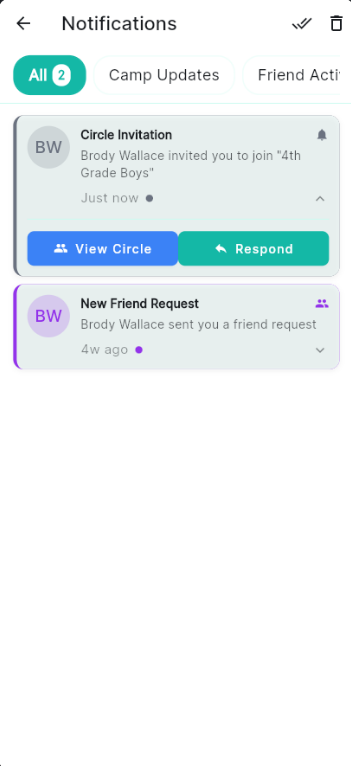
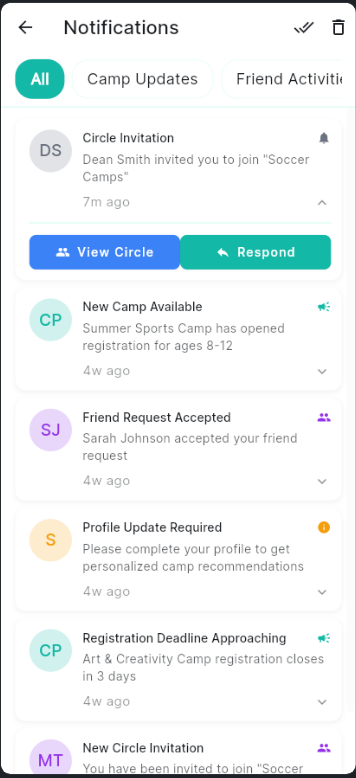
Notifications keep you up to date — tap any item to respond or get more details
Types of Notifications
Use the tabs at the top of the Notifications screen to filter what you see:
- All — Every notification, newest first.
- Camp Updates — Registration deadline reminders and changes to camps you're tracking.
- Friend Activity — Friend requests and activity from your connected parents.
Circle Invitations
When a parent invites you to join their Circle, you'll see a Circle Invitation notification. Tap it to expand, then choose:
- View Circle — Preview the Circle before deciding.
- Respond — Opens a dialog to Accept or Decline the invitation.
Friend Requests
When someone sends you a friend request, a New Friend Request notification appears. Tap it to expand and accept or decline. Learn more about Friends →
Registration Deadline Reminders
Camp PlanIt watches the camps in your planning list and sends you a heads-up when a registration deadline is approaching — for example, "Art & Creativity Camp registration closes in 3 days." Tap the notification to open that camp's detail page.
Profile Completion Prompts
If your profile is incomplete, you may see a Profile Update Required notification. Tap it to fill in your details so Camp PlanIt can give you better camp recommendations.
Managing Your Notifications
- To mark all as read, tap the double-check icon at the top-right of the Notifications screen.
- To delete all notifications, tap the trash icon at the top-right.
- Individual notifications can be dismissed by tapping them and taking the available action.
Push Notifications
Camp PlanIt can also send push notifications to your phone so you don't miss important updates even when the app is closed. To turn these on:
- Open your phone's Settings app.
- Find Camp PlanIt in your app list.
- Tap Notifications and make sure they're turned on.